Editorial
White Paper
How Enterprise Legal Teams Are Rethinking How Matters Get Managed

If you want to preserve the value of your website, it is critical to track page speed performance, especially the time it takes for your most important pages to load. This is a critical element of one of six fundamental areas of website value, in this case the “experience” that can directly influence conversions.
Many digital marketers and website developers know that page speed affects SEO and conversions, yet decisions around content, user experience and coding can still sometimes slow pages down. Keping an eye on page speed is critical because poor website performance can immediately devalue your website. The good news is that there are several free tools that can help track page speed and protect your investment in your website.
Website page load times can directly impact revenue. A slow loading page can make all the difference in terms of conversions and even abandoned visits. Research from Akamai from as back as 2017 found that 0.1 second delay can lead to a reduction in conversions up to 7%, a figure that is often erroneously quoted as being a 1 second delay. The same research suggests a more significant 2-second delay will more or less double your bounce rate. A subsequent report from Deloitte Digital also observed that a 0.1 second increase in site speed on mobile leads to a 8.4% increase in conversions and an increase of 9.4% order value on retail sites.
Of course, page performance also impacts SEO, with Google’s algorithms taking into account your Core Web Vitals — three core analytics which includes the “Largest Contentful Paint (LCP)” — the time it takes for the very largest asset on a page such as a video or image to appear. Optimizing pages for Core Web Vitals as a practice to improve SEO could then also improve conversions; for example, testing from Vodafone found that an improvement of 31% for the LCP vital led to an 8% increase in sales.
Related Article: SEO Meets AI: Why Generative Engines Are the New Gatekeepers of Discovery
Arguably web pages are getting more complex and there are a number of different elements that can slow your page down. If you do suffer from slow page speeds, here are some of the contributory factors. When introducing any of these on your homepage or key landing pages, always assess the impact on page loading time.
Chatbots are now a standard feature of many websites, but they can lead to issues if they are not effectively optimized for performance. The combination of requests made to the chatbot provider and heavy CSS or JavaScript code can result in a slower page. If a chatbot is also set to load early into your page, it can also delay other essential content from rendering.
The good news is that there are multiple actions that can help increase performance, including reducing the amount of code employed, ensuring the chatbot loads later, and even switching to a lighter weight chatbot provider.
Images and banners are an obvious issue that can increase the size of a page. Besides being sensible with the images deployed on a page, it is important to optimize image sizes to devices. Sometimes an image or banner will be served in full resolution and then resized on the fly within the browser, causing a delay. This can be avoided by having images that are sized correctly and load specifically to common devices, avoiding having to make any compromises with your content.
Some sites are be riddled with third-party cookies covering functional, analytics and advertising areas. One well-known media business site’s cookie preferences center lists over 800 advertising cookies! Having unnecessary trackers has the potential to add delay to your page with additional scripts and extra processing — as well as impacting customer trust and the user experience. Reviewing and cleaning up unnecessary cookies can improve load speeds, support better brand integrity and more.
Redirects are an important part of web management and over the years a website can pick up quite a few through site restructures, domain changes, shortened URLs to customers and more. But as you add more, you need to ensure that the user experience is not impacted. When a user has to go through a “redirect chain” then it can feel like it is taking an age for a visitor to reach their direction. Keep an eye on redirects and regularly remove any that are unnecessary.
Embedded videos can be great for a website page, but they can be involving loading heavy scripts and also call multiple third-party domains. In particular a video above the fold can impact page performance. Sometimes videos play as a web background on a homepage which creates an impression, but whether this justifies a reduction in site performance is debatable. Embedding a video which appears below the fold may have less impact on Core Web Vitals.
Over the years a site can accumulate scripts and libraries that are loaded onto every single page, but actually the original features they relate to have actually been retired. This unnecessary code adds additional bloat to a page and is often caused by a reluctance to remove code, particularly when different coders work on a site and might not be sure of the context or the impact of the code previously there.
A review of the scripts that are actually in use can reduce the work a browser needs to do, and will optimise load times in a way that doesn’t compromise the design or content.
Similarly, some sites have a single, large stylesheet for all pages. However, not all aspects of a stylesheet might apply to a particular page, so unnecessary code may be loading. One way to better optimise CSS is to only apply what is necessary for different page templates, for example.
Some web pages can get extremely busy with widgets and pop-ups that each pull in their own script and style sheets, and potentially request additional content from other servers. Do you really need that social feed, call to action, chatbot, booking tool or mailing list sign-up pop-up to appear on the page? Multiple components of this type not only slow downpages, but dilute the user experience, cause distractions and can just be really annoying for your visitors.
Some pages are set up which have to wait on responses from external domains to load a map, pick up a font or perhaps track a link. This is not always a problem but if these external domains are subject to their own issues, or links are broken, then your visitors may experience a delay. If these links regularly cause performance problems, then it is worth reviewing whether it is better to remove the links in question or seek an alternative.
Of course, there are other factors that can cause performance issues such as rogue code. There can also be missed opportunities such as not using a CDN, avoiding caching, or not having good load balancing set up.
Related Article: SEO Sidekick: The Rise of Answer Engine Optimization
First, you need to check your page load times and performance. Pick a selection of landing pages and your homepage. Checking times is then very straightforward, as there are number of free tools available where you can do so. Full disclosure: my own company is behind the aaanow.ai tool.
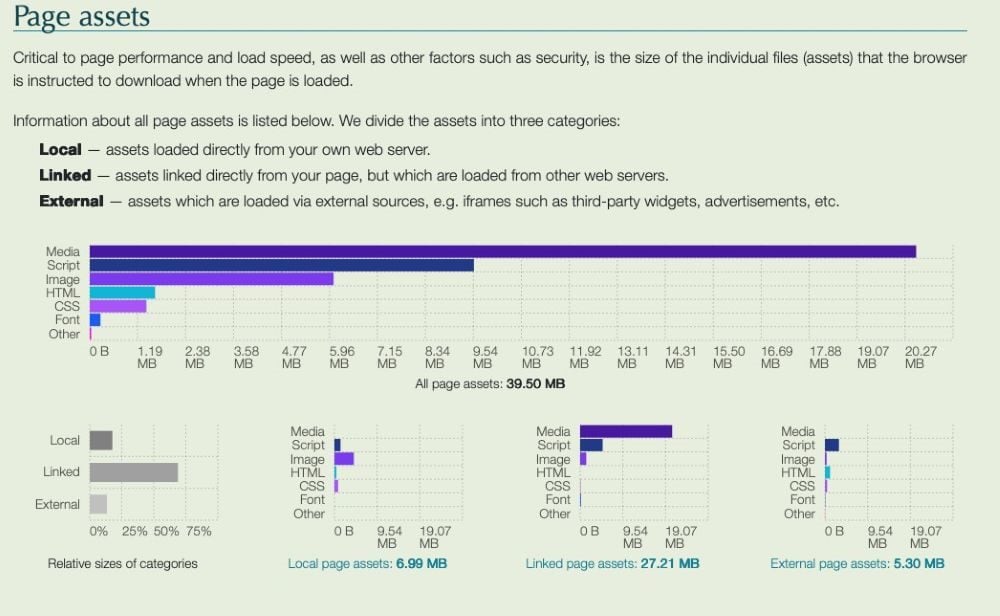
If you find an issue, some of these tools will indicate where the problem may lie, for example breaking down the load behavior into area such as assets, requests to third parties and so on.
If there is an issue, consider creating a clone page where a different element is not included, for example a chatbot, and then compare the load times with the existing page. Testing in this way will help to determine where the problem lies.
If you do have any issues with page load times, then remove the particular element that is causing the problem. It can feel like you are making a compromise here, but there are usually alternative options that can help you get the balance right between user experience and website performance. Going forward, also test page load times before introducing key content pages, new features or launching campaigns.
Despite all the current focus on ChatGPT and LLMs, websites still matter and are an important investment for any business. But it’s important to protect that investment and ensure it maintains value. Tracking your website page times is a good starting point to ensure you continue to generate leads and sales through the year.
 Learn how you can join our contributor community.
Lawrence Shaw is the founder of AAAnow. He has managed the Boeing/RR 777 EMCS, launched an ISP in 1999 and an early e-commerce platform in 2002. Connect with Lawrence Shaw: 