Editorial
Research Report
Building the Case for Modern Public Sector Messaging


An AI assistant that answers a return-policy question creates a content risk if it gets the answer wrong. An AI agent that can issue a refund, change a shipping address or cancel an order creates an operational risk.
Much of the enterprise AI conversation has focused on what models say: accuracy, hallucination, bias, tone, safety and brand alignment. Those issues still matter. But as agents move into customer experience, commerce and operations workflows, the bigger question is shifting from response quality to action authority.
What can the agent view? What can it recommend? What can it change? When does it need approval? When must it hand the work to a human?
These are customer experience questions. If an agent applies the wrong discount, cancels the wrong order or promises a resolution the business cannot honor, the customer experiences it as a broken promise.
Gartner has predicted that more than 40% of agentic AI projects will be canceled by the end of 2027 because of escalating costs, unclear business value or inadequate risk controls. It also predicted that 33% of enterprise software applications will include agentic AI by 2028, up from less than 1% in 2024.
That gap should get leaders' attention. AI agents are moving into enterprise software, but many organizations have not yet defined the permission model around customer-facing actions.
Guardrails and permission rules are often discussed as if they are the same thing. They are not.
Guardrails usually focus on what the AI says. Permission rules focus on what the AI can do. They define which systems, records, workflows and tools an agent is allowed to access or execute.
That distinction matters because tool-using agents change the risk model. Recent CMSWire coverage has explored how agentic AI is changing CX workflows and how the Model Context Protocol is helping AI agents connect with enterprise tools and systems.
Those developments raise a practical question: Once an agent can connect to enterprise systems, who decides what it is allowed to do inside them?
A customer-facing agent might safely check order status. That does not mean it should cancel the order. It might recommend a refund. That does not mean it should release funds. The issue is whether its authority matches the business risk of the action.
Related Article: Agentic Customer Experience: The CX Architecture Built for the World Customers Actually Live In
CX and commerce leaders need a simple way to classify what AI in contact centers and live workflows can do.
| Agent mode | What the agent can do | Example customer workflow |
|---|---|---|
| Read-only | View approved information | Check order status or inventory |
| Recommend-only | Suggest a next action | Recommend refund path or service option |
| Draft-only | Prepare but not send or execute | Draft response or case note |
| Execute-limited | Complete low-risk actions | Update preference or create ticket |
| Execute-gated | Act after approval or verification | Apply discount, refund or address change |
| Escalate | Stop and route to human | Payment issue, high-value order or policy conflict |
This model helps avoid a common mistake: treating AI access as one broad permission. Access should not be binary. It should be tied to action risk.
A product discovery agent may only need read-only access to approved product content and availability signals. A service assistant may need draft-only authority. A commerce agent that can modify carts, apply discounts or initiate returns needs stronger approval logic, logging and rollback paths.
IBM has described agentic AI risk as a runtime issue because agents reason, decide, execute and adapt while invoking tools and changing state dynamically. In practice, an agent may not just answer a customer; it may trigger a system action, update a record or change a workflow state.
For CX leaders, permission boundaries must be designed into the workflow.
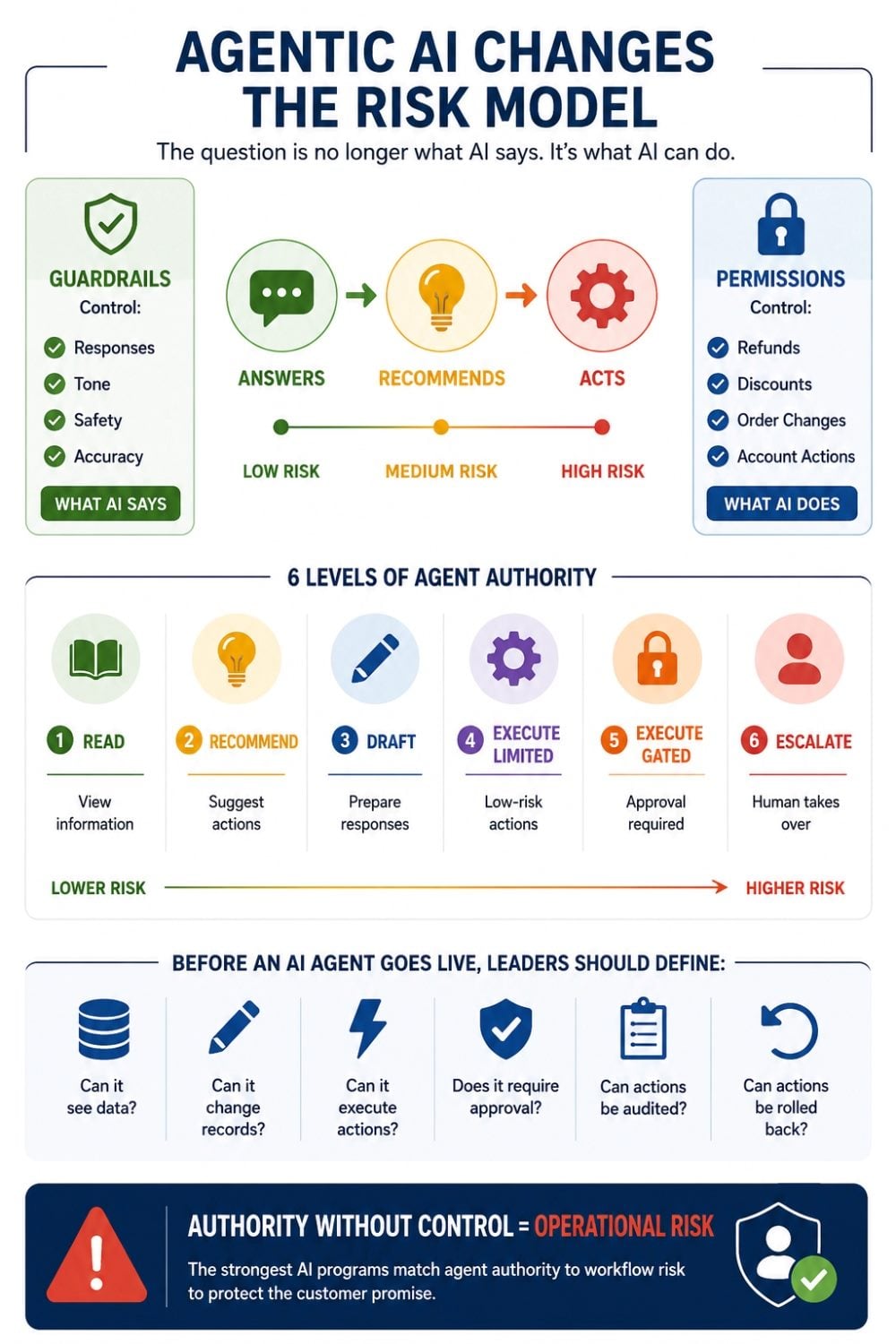
Not every AI action deserves the same level of control. Stricter approval is often needed for refunds or credits, discounts, order cancellations, address changes, payment-adjacent actions, account entitlement changes, warranty decisions, high-value order modifications and frustrated or escalated customers.
These are the moments where AI can create, change or reverse a customer commitment. A fast answer is helpful. A fast wrong action is expensive.
The first step is to inventory the actions, not just the tools.
Many AI programs begin by asking which systems an agent should connect to: CRM, order management, knowledge base, commerce platform, marketing automation or service platform. That is only part of the question.
A better starting point is this:
What customer commitments could this agent create, change or reverse?
From there, teams should turn permission rules into workflow requirements across five areas:
This work should not sit only with IT or security. Permission boundaries are where customer promise, business policy and system access meet.
The following table highlights the most important lessons, actions and strategic considerations emerging from this topic.
| Key Area | What Happened | Why It Matters | Recommended Action |
|---|---|---|---|
| Permission vs. Guardrails | Enterprises have focused AI governance on response quality while agentic tools now execute live customer actions | A wrong refund or canceled order is an operational failure, not a content risk — existing guardrail frameworks don't cover it | Audit all customer-facing AI deployments for action authority, not just output safety |
| Agentic AI Adoption Risk | Gartner predicts 40%+ of agentic AI projects will be canceled by end of 2027; 33% of enterprise software will include agentic AI by 2028 | The gap between adoption pace and risk readiness is large — and closing it requires deliberate permission design, not just faster deployment | Establish a permission boundary model before scaling agents into production workflows |
| Action Risk Classification | Most AI deployments treat system access as binary — connected or not connected | Binary access doesn't account for the difference between reading an order status and canceling the order | Map every agent capability to one of six permission modes: read-only, recommend-only, draft-only, execute-limited, execute-gated or escalate |
| Pre-Deployment Readiness | Many CX teams can answer which systems an agent connects to but cannot answer what the agent is allowed to do inside them | System connectivity without action authority means the agent can create commitments the business didn't intend to authorize | Require teams to complete the seven-question pre-deployment checklist before any agent enters a live customer workflow |
| Audit and Rollback | Agent actions often update records, trigger workflows or change customer-facing state in real time | Without logging and rollback capability, a wrong agent action may be irreversible or operationally expensive to correct | Define audit and rollback paths as a workflow requirement, not an afterthought, before agents execute in production |
Before deploying an AI agent into a live customer workflow, leaders should be able to answer these questions:
If the team cannot answer those questions clearly, the agent may still be useful. But it is not ready for full customer-facing execution. It may belong in a sandbox, a pilot, a draft-only workflow or a tightly supervised use case.
The goal is not to slow AI down. The goal is to make AI safe enough to scale.
The next phase of enterprise AI will not be defined only by better models. It will be defined by better operating control.
The strongest AI programs will give agents the right level of authority for the right workflow, with the right controls around the agentic customer experience promise.
 Learn how you can join our contributor community.

Nixalkumar Patel is a senior product and digital transformation leader specializing in enterprise omnichannel digital commerce transaction execution and orchestration across D2C, B2C and B2B/SMB channels, including AI-enabled governed conversational commerce. With more than 13 years of experience, his work focuses on building the governance, validation and orchestration layers that help enterprise transactions execute correctly, reliably and auditably across customer journeys, fulfillment ecosystems and core business systems.