Editorial
Research Report
Building the Case for Modern Public Sector Messaging


Using agentic AI in customer experience is advancing so quickly that the conversation about AI has shifted from user adoption to agent accountability. Deploying an AI agent that can answer analytics questions, narrate dashboards and surface CX insights is no longer the hard part.
Getting that agent to answer consistently and accurately — without introducing the kind of confident-sounding misinformation that derails a campaign decision — is where most deployments quietly stall. Marketers are adopting to AI, but they are also asking whether an AI agent's responses are reliable.
Gartner predicts that 40% of enterprise applications will be integrated with task-specific AI agents by the end of 2026, up from fewer than 5% in 2025. As agent adoption accelerates, the accuracy of those agents becomes a governance concern, not just a product feature.
Tableau's Q&A Calibration, available in beta in Tableau Next, is a direct response to that concern — a built-in mechanism for testing, scoring, and correcting AI agent responses before they become the basis for CX decisions.
In this post, I will examine Tableau's answer for accuracy, its Q&A Calibration feature and how Q&A Calibration works. This article will also look at what marketing and CX teams should do to make the feature operationally effective.
Editor’s note: Key questions surrounding AI calibration, analytics accuracy and the operational risks of agentic AI in customer experience.
The feature creates a structured feedback loop where teams evaluate AI responses, identify inaccuracies, apply corrections and monitor improvements over time to reinforce more reliable answer patterns.Tableau’s Q&A Calibration feature is a beta capability in Tableau Next that allows teams to test, score, correct and re-test AI-generated analytics responses to improve accuracy and consistency.Marketing operations, analytics, customer journey, contact center and digital experience teams benefit most because they rely heavily on analytics insights to guide customer-facing decisions.AI-generated analytics responses increasingly influence campaign decisions, personalization strategies and customer journey actions. Inaccurate answers can lead teams to make operational and budget decisions based on flawed insights.Customer journeys, campaign structures and business terminology evolve constantly. Without recurring calibration, AI agents can drift away from operational reality and deliver outdated or misleading responses.
But first, some industry context.
When an AI analytics agent gets a response wrong, the error does not stay in the analytics platform. It travels. A campaign manager who asks why conversion rates dropped and receives an inaccurate explanation — one that sounds authoritative and cites real metrics — will act on that explanation. The adjustment they make will be wrong. The budget reallocation, the message change, the channel shift: all of it flows from a flawed answer delivered with machine confidence.
Gartner found that 63% of organizations either lack or are unsure whether they have the right data management practices for AI, and predicts that through 2026, 60% of AI projects unsupported by AI-ready data will be abandoned. The data quality problem and the response accuracy problem are related. An AI agent operating over fragmented, poorly labeled or inconsistently governed data will produce responses that reflect those conditions — and marketing and CX teams often have no structured way to detect that until a decision has already gone wrong.
Research findings from the MIT NANDA study, surfaced in CMSWire's coverage of the Medallia-Ada partnership, found that just 5% of enterprise AI pilots deliver significant value while 95% fail to produce measurable P&L impact. That failure rate does not typically trace back to the model itself. It traces back to the gap between what the AI was calibrated to answer and the specific language, metrics, and business logic of the organization deploying it. Q&A Calibration is designed to close that gap before it becomes a failed pilot.
Related Article: Before You Scale AI in Customer Experience, Fix These 5 Things
How AI analytics failures affect customer trust, operational decision-making and the broader relationship between data governance and customer experience outcomes.
| Key Theme | What It Means | Why It Matters for CX Leaders |
|---|---|---|
| AI Accuracy Is a CX Issue | AI-driven analytics errors increasingly affect customer interactions, personalization and operational decisions, making accuracy a direct CX concern rather than just a technical issue. | Poor AI recommendations can damage customer trust, loyalty and satisfaction faster than traditional technical failures. |
| Inaccurate Insights Create Customer Friction | Bad analytics outputs can lead to poorly timed outreach, irrelevant messaging and flawed service actions that erode customer relationships. | AI mistakes often appear personalized and authoritative, making customer disappointment more visible and more damaging. |
| Data Readiness Matters More Than Models | The biggest AI failures usually stem from siloed systems, weak governance and inconsistent data rather than flaws in the underlying algorithms. | Organizations focusing only on AI deployment without fixing data quality issues often struggle to generate measurable business value. |
| Cross-Functional Alignment Is Essential | AI analytics require coordination across marketing, CX, operations and data teams to ensure outputs reflect real business context. | Disconnected teams create gaps between AI-generated insights and operational reality, increasing the risk of inaccurate decisions. |
| Human Oversight Remains Critical | Successful AI programs still depend on human review, empathy and escalation paths to human agents. | AI performs best when augmenting frontline judgment rather than replacing human intuition entirely. |
| AI Accuracy Determines CX Trust | The reliability of AI analytics ultimately shapes whether AI becomes a strategic advantage or a customer experience liability. | Organizations that prioritize governance, transparency and operational calibration are more likely to sustain long-term customer trust. |
| Customer Experience Depends on Better Data | When AI analytics miss the mark, the problem is often rooted in fragmented customer data and missing business context. | Improving AI outcomes requires treating customer data quality as a core operational discipline rather than a backend technical project. |
| AI Analytics Are Reshaping CX Strategy | Organizations increasingly view AI-powered analytics as a strategic investment capable of transforming customer engagement and operational agility. | Companies that operationalize trusted AI insights effectively can create stronger personalization, retention and customer lifetime value outcomes. |
Now let's breakdown Tableau Q&A Calibration, which sits inside the Tableau Next product line; that represents Tableau's emerging agentic analytics architecture. Tableau Next is an API-first analytics experience that integrates Tableau with Agentforce.
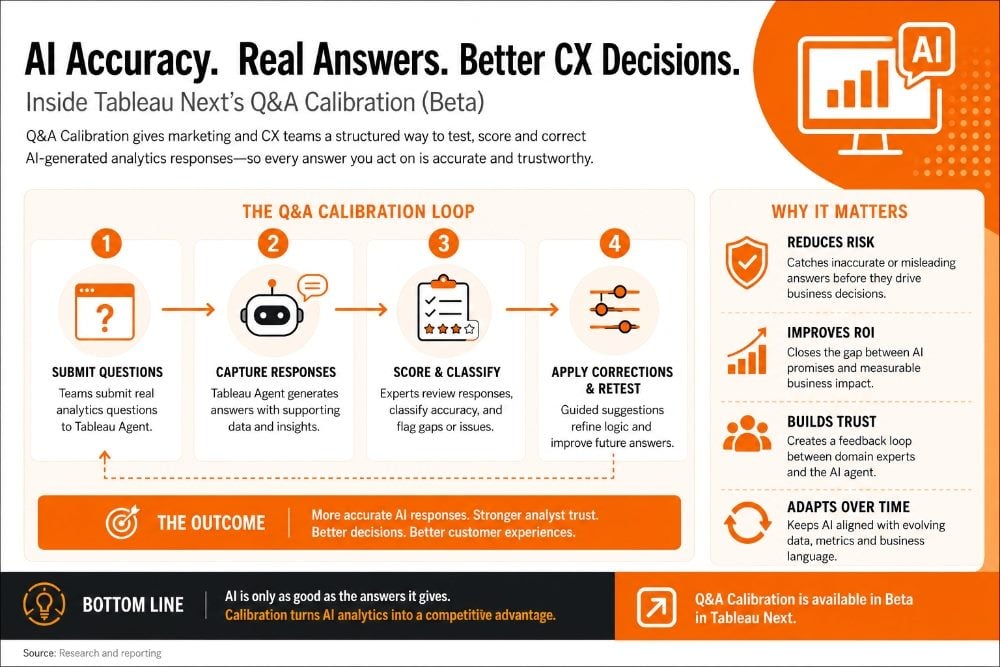
Q&A Calibration leverages Next's ability to provide contextual, AI-powered insights into an analysts' workflow. Users operate the feature in three phases: a team submits a set of analytics questions to Tableau Agent, captures and reviews the responses, classifies their accuracy, and then applies guided corrections where the AI falls short. Those corrections reinforce more accurate response patterns and can be re-tested to confirm improvement.
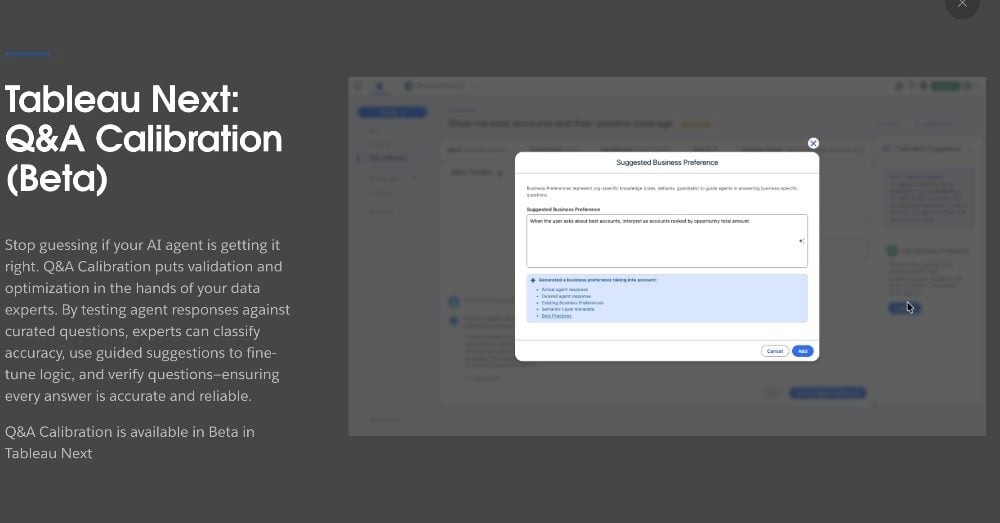
The practical gain for CX and marketing teams is a feedback loop between their domain knowledge and the AI agent's behavior — something that most AI analytics deployments currently lack. Without a calibration mechanism, teams adapt their questions to avoid the AI's weak spots, which is a workaround that erodes confidence and reduces usage. With calibration, the weak spots become addressable. The agent learns the terminology of the customer journey, the naming conventions of the campaign taxonomy, and the relationships between the metrics the team actually cares about.
The competition to stay accurate while using AI will rise. Gartner predicts that by 2027, half of all business decisions will be augmented or automated by AI agents. For CX teams, that means the accuracy of every customer-facing judgment — routing logic, personalization rules, escalation triggers — will increasingly depend on what an AI agent concludes from data. Q&A Calibration is the evaluation layer that makes those conclusions auditable.
Q&A Calibration in Tableau Next gives teams a structured process to evaluate and improve AI agent accuracy. Each step compounds on the previous one — accuracy classification without correction loops produces a diagnosis without a treatment. This table outlines four calibration steps for ensuring AI accuracy and their direct influence on CX workflow outcomes
| Calibration Step | What It Involves | CX Workflow Outcome |
|---|---|---|
| Test AI Responses | Submit analytics questions to Tableau Agent and capture its responses across a set of representative queries | Surfaces gaps between the AI's understanding of data and the actual business context your CX team operates in |
| Classify Accuracy | Label each response as accurate, partially accurate, or misleading using a structured scoring approach | Creates an evidence base for which question types the AI handles well and which require human review before acting |
| Apply Guided Corrections | Use Tableau's correction interface to supply preferred answers and reinforce correct response patterns | Tunes the AI agent to campaign-specific, journey-specific, and product-specific language used by your CX team |
| Monitor and Re-test | Re-run the test set after corrections to verify improvement and catch regression on previously accurate responses | Establishes a continuous improvement loop that raises AI reliability over time rather than accepting one-time calibration |
The four-step loop is the key structural point. Single-pass calibration — test once, correct once, move on — is a risk management failure in CX environments where campaign language, product names, and customer segment definitions change regularly. The teams that will see durable accuracy gains are the ones that treat calibration as a recurring practice, not a launch checklist item.
A breakdown of the major AI, analytics, governance and workflow features Tableau introduced in its April 2026 release cycle and why they matter for enterprise CX, marketing and analytics teams.
| Feature | What It Does | Why It Matters |
|---|---|---|
| Tableau Next MCP | Connects AI agents directly to Tableau’s analytics engine using secure semantic context and governed business logic. | Positions Tableau as an orchestration layer for agentic analytics rather than just a visualization platform. |
| Inspector in Slack (Beta) | Delivers proactive metric alerts and natural-language follow-up analysis directly inside Slack DMs. | Pushes analytics into operational workflows where teams already collaborate. |
| Q&A Calibration (Beta) | Lets teams test, score, correct and re-test AI-generated analytics answers. | Addresses one of the biggest enterprise AI concerns: trusted analytics accuracy. |
| Semantic Model Selection | Allows admins to restrict AI agents to approved semantic models and vetted datasets. | Strengthens AI governance and reduces hallucination risk from unapproved data sources. |
| Semantic Model Scope and Page Filters | Provides visibility into the filters and semantic logic used to generate AI answers. | Improves explainability and auditing for AI-driven analytics. |
| Sankey Charts | Adds native Sankey visualizations for showing flows and transitions between states. | Useful for customer journey mapping, funnel analysis and operational flow tracking. |
| Table Color Values | Adds dynamic color cues directly within tables without requiring calculated fields. | Speeds insight discovery and improves dashboard readability. |
| Groups and Bins Enhancements | Improves segmentation and grouping flexibility for continuous datasets. | Helps CX and marketing teams analyze audience segments more dynamically. |
| Tableau App for Microsoft 365 | Embeds Tableau dashboards and Pulse metrics directly into PowerPoint, Word and Teams. | Brings governed analytics into daily productivity workflows and executive storytelling. |
| Geospatial Point Maps (Beta) | Introduces a new map visualization for uncovering regional and spatial trends. | Supports geographic analysis for customer behavior, retail performance and operations. |
| Pulse Metrics in Exports and Subscriptions | Adds Tableau Pulse KPIs into dashboard image exports and email subscriptions. | Keeps executive summaries and operational metrics unified in one workflow. |
| Enhanced Q&A Correlation Insights | Uses AI to surface relationships between metrics across different data sources. | Helps teams identify business drivers and hidden operational patterns faster. |
| AI-Assisted Color Palettes | Generates accessible custom color palettes using AI prompts. | Speeds dashboard design while improving accessibility compliance. |
| Rounded Corners | Adds native rounded-corner design controls for dashboards. | Improves visual polish without requiring workaround design techniques. |
| Google Looker Connector | Connects Tableau directly to governed Looker data models. | Signals increasing interoperability across enterprise analytics ecosystems. |
| Amazon S3 Connector (Beta) | Enables direct access to CSV and Parquet files in Amazon S3. | Improves cloud-native analytics workflows and reduces dependency on legacy connectors. |
| External Key Management for Extracts | Lets enterprises manage Tableau Cloud encryption keys through AWS KMS. | Addresses enterprise security and compliance requirements. |
| Tableau Prep In-Database Processing for Snowflake (Beta) | Executes Prep operations directly inside Snowflake instead of locally. | Improves performance for large-scale cloud analytics workflows. |
| Bridge Monitoring Enhancements | Adds detailed monitoring, audit trails and workload visibility for Tableau Bridge. | Improves operational reliability for hybrid and cloud-connected deployments. |
Q&A Calibration is stil in beta in Tableau Next as of May 2026, which means teams have a runway to prepare before it becomes a standard expectation. The preparation work is practical and begins with something most organizations have not done: a structured audit of where their AI agent already fails.
Every team that has used Tableau Agent in any capacity has a short, informal list of query types where the AI's responses seem off — metric definitions that don't match, segment labels that get confused, time-period comparisons that return unexpected numbers. Those are the calibration starting candidates. Documenting them before entering the calibration interface gives the process direction and makes it easy to measure before-and-after accuracy.
Generic analytics agents are trained on broad data contexts. The terminology that matters for CX — journey stage names, campaign taxonomy, contact reason codes, resolution categories — is specific to each organization. Calibration sessions that ground AI responses in this language produce agents that are operationally useful, not just technically functional. Map your journey language to your most common analytics question types before your first calibration session.
The CX landscape changes enough in three months — product launches, campaign resets, cha;nnel shifts — that a calibration set built in January can be stale by April. Building re-test cycles into quarterly analytics planning keeps accuracy aligned with operational reality and catches regressions before they affect decisions.
The broader context is that agentic AI in CX is moving from novelty to infrastructure. The teams extracting real ROI from these systems are not necessarily the ones with the most sophisticated models — they are the ones with the most rigorous feedback loops between AI behavior and operational outcomes.
Q&A Calibration is Tableau's mechanism for building that loop into the analytics workflow. Whether it delivers depends on whether CX teams use it actively enough to make it matter.
 Learn how you can join our contributor community.

Pierre DeBois is the founder and CEO of Zimana, an analytics services firm that helps organizations achieve improvements in marketing, website development, and business operations. Zimana has provided analysis services using Google Analytics, R Programming, Python, JavaScript and other technologies where data and metrics abide.